databricks-agent-kit - Design
Status: approved for implementation (2026-10-18); revised and implemented 2026-10-19 with result export, a minimal tool surface and a logging policy; revised 2026-11-03 with the metadata cache and a REST-only describe_table (ADR 0021, implemented 2026-11-03). Decisions: adr.
1. Goal
Give coding agents (Claude Code, Codex, OpenCode, OmO, Cursor) autonomous, governed access to Databricks data through our own MCP server: run SQL and inspect Unity Catalog metadata, over stdio or Streamable HTTP, with persistent operational logs.
Skills are out of scope for the code: the official installer (databricks aitools install) already handles them. The README documents which official skills to avoid and how to make agents prefer this MCP when conflicting skills are installed.
Hard constraints
| Constraint | Consequence |
|---|---|
| No Databricks-served models, no AI Gateway / Unity Gateway | Agents keep their own model subscriptions; nothing here routes inference |
No Databricks-managed MCP servers (system.ai.*, /api/2.0/mcp/*) | The MCP talks only to public workspace REST APIs |
| No Genie | Metadata + SQL tools replace Genie-style discovery |
| Do not assume an edition (Free, Premium, Enterprise) | Every feature is attempted; unsupported ones fail with an explicit, actionable message |
| Low resource usage | TypeScript on Node.js, minimal dependencies (measured: ~72 MB RSS, ~0.7 s start vs ~126 MB, ~3 s for Python + SDK) |
| No external services for operation | Logging uses a local SQLite file |
| Few dependencies, official Databricks capabilities first | Only public REST APIs and fetch (ADR 0001); one extra dependency, parquet-wasm (ADR 0004) |
2. Architecture
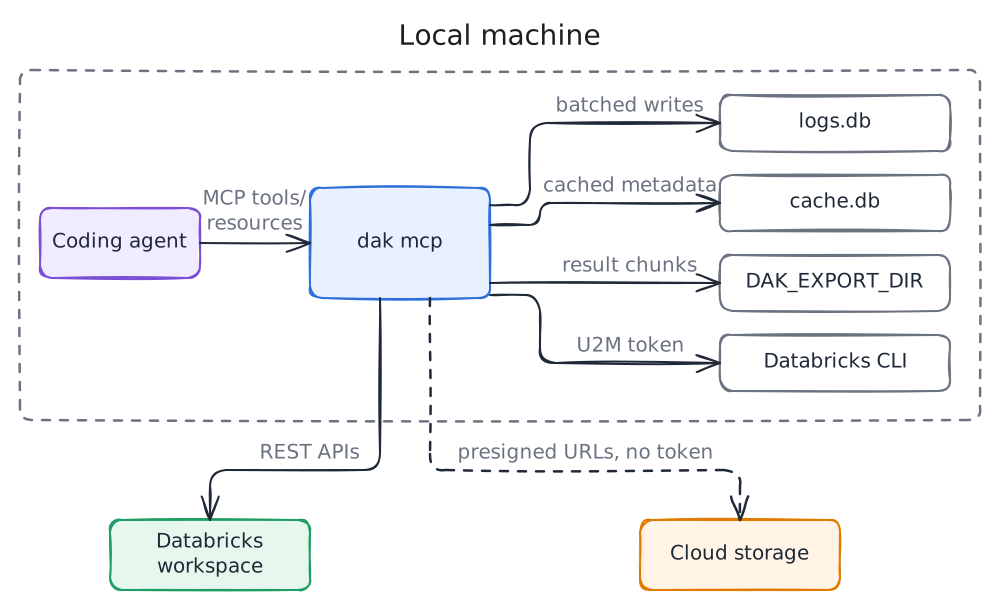
One package, one binary (dak):
| Command | Purpose |
|---|---|
dak mcp [--transport stdio|http] [--host] [--port] [--profile] [--allow-writes] | MCP server |
dak doctor [--profile] | Check auth, warehouse, permissions, optional features, result download, export directory and log storage; report what is unsupported |
3. Databricks access
Only public workspace REST APIs, called with native fetch (no Databricks SDK dependency, ADR 0001):
| API | Used for |
|---|---|
POST/GET /api/2.0/sql/statements, .../cancel, .../result/chunks/{n} | SQL execution (Statement Execution API) and result chunks |
GET /api/2.0/sql/warehouses | Warehouse discovery and default selection |
GET /api/2.1/unity-catalog/catalogs|schemas|tables | Metadata, columns, comments, constraints, change times |
system.information_schema.* (via SQL) | Search by name/comment |
Presigned URLs from EXTERNAL_LINKS (cloud storage) | Export downloads, sent without an Authorization header |
3.1 Authentication
Resolution order follows Databricks unified-auth conventions:
- Explicit profile (
--profile): only that profile from~/.databrickscfgis used; environment credentials are ignored. - Environment:
DATABRICKS_HOSTplus eitherDATABRICKS_TOKEN(personal access token) orDATABRICKS_CLIENT_ID+DATABRICKS_CLIENT_SECRET(OAuth M2M, service principal). - Profile from
~/.databrickscfg(DATABRICKS_CONFIG_PROFILE, elseDEFAULT; the file can be changed withDATABRICKS_CONFIG_FILE):token-> personal access token.client_id+client_secret-> OAuth M2M viaPOST {host}/oidc/v1/token(client_credentials, scopeall-apis).auth_type = databricks-cli-> OAuth U2M delegated todatabricks auth token --profile <p>; the CLI owns login, cache and refresh.
- Anything else -> explicit error naming the profile and the supported auth types.
Tokens are cached in memory until shortly before expiry. Secrets are never logged or returned in tool output.
4. MCP surface
4.1 Tools
Kept small to limit context cost (ADR 0006). The 12 tools of the first implementation cost about 1155 tokens of definitions (4944 characters of JSON); the five tools take under 2500 characters, a budget that the tests assert. To fit it, the $schema URI that zod adds to every input schema is stripped.
| Tool | Input | Output |
|---|---|---|
list_objects | catalog?, schema?, pattern?, limit?, refresh? | Catalogs, schemas or tables (name, type, comment) depending on the arguments; truncated; cache |
describe_table | full_name, refresh? | Table comment/type/format/owner, columns (type, nullable, comment), PK/FK constraints, clustering/partitioning, created and updated time and user; cache |
search_metadata | query, catalog?, limit? | Tables and columns whose name or comment matches (information_schema) |
execute_sql | statement, parameters?, catalog?, schema?, row_limit?, warehouse_id?, export? | Columns, rows, row count, truncated, statement_id; or statement_id + state if still running; with export, the export descriptor |
get_statement | statement_id, wait_seconds?, cancel? | State, then result when finished; progress and files for an export; wait_seconds (0 to 30) waits before answering; cancels when asked |
The server sends MCP instructions and tool descriptions stating that these tools take precedence over the Databricks CLI for SQL and metadata.
list_objects and describe_table use only the Unity Catalog REST API and never start a warehouse; their answers come from the metadata cache (4.7). A sample of the data is a query for execute_sql.
4.2 Resources
| URI | Content |
|---|---|
resource://databricks/warehouses | { warehouses[] } with the default one marked |
resource://logs/errors/recent | { generatedAt, errors[] } |
resource://logs/executions/recent | { executions[] } |
resource://logs/execution/{executionId} | { execution, logs[] } |
resource://logs/stats | { last24h: { executions, errors, warnings } } |
resource://cache/stats | Cache totals of the current identity, by kind |
resource://cache/entry/table/{fullName} | One cached table description and its counters |
resource://cache/entry/listing/{path} | One cached listing and its counters |
4.3 SQL execution rules
The statement lifecycle module (src/statements.ts, ADR 0009, terms in GLOSSARY.md) owns everything below: it builds the request, applies the read-only policy, submits, polls, cancels and shapes the bounded result. Its interface is submit(request) (plain statement of the agent, always under the read-only policy), submitServerSql(request) (plain statement of server-written SQL, no check), query(request) (server-written SQL that must finish), submitExport(request, format), awaitExport(statementId, signal), exportChunkLink(statementId, index, signal), get(statementId, { rowLimit?, waitSeconds? }) and cancel(statementId) (the export methods are in ADR 0010). The read-only policy is implemented once and is chosen by the entry point (ADR 0015): it applies to submit and submitExport (execute_sql and exports); statements the server writes itself (metadata queries through query, doctor probes through submitServerSql) skip it, and the tool handlers receive only submit, get and cancel (AgentStatements). awaitExport waits with a sleep that its abort signal releases, so an aborted wait leaves no timer behind. The export manager makes no statement request: it submits, waits, requests chunk links and cancels through this module. The doctor's download check also runs on this module (submitExport, awaitExport, exportChunkLink, cancel), so src/statements.ts is the only file that builds the statements path. get_statement asks the statement lookup (src/statement-lookup.ts, ADR 0011) about any id: get(statementId, { waitSeconds? }) and cancel(statementId). An id that the export manager knows is an export (its state, or cancelled: false with its state when it already ended); any other id is a plain statement that goes to get and cancel of this module; the tool handler has one path (the server builds the lookup from the statements and exports of the workspace on each call, ADR 0014). The warehouse selection module (src/warehouses.ts, ADR 0012) is a separate responsibility: resolve(explicit?) gives the warehouse id (explicit, then configured, then the remembered automatic choice) and list() gives the accessible warehouses with the default marked. The lifecycle module receives resolve as an injected function and never depends on the module itself.
Read-only by default (ADR 0008). Anything that is not a plain leading read keyword is analyzed by Databricks itself, so comments, string literals and dialect features need no handling here and nothing is executed:
- Statements holding a
;before their last non-whitespace character are rejected without any call, so the check never submits several statements. Read-only mode cannot tell several statements from a;inside a literal; theRead-only modemessage tells the agent to pass such literals as:nameparameters. A single trailing;is accepted. - Statements starting with
SHOW,DESCRIBE,DESCorEXPLAINas a whole word, preceded only by spaces, tabs or line breaks and not followed by a:(a SQL-scripting label), are accepted without an extra call. Comments are not skipped, so a statement that starts with a comment goes throughDESCRIBE QUERY. - All others must pass
DESCRIBE QUERY <statement>, which succeeds only for queries.
A read command costs no extra call and a query costs one. A parse error of the check becomes a
Read-only modeviolation whose message tells the agent to remove a leading comment. An export goes through the same check. Writes require--allow-writes(orDAK_ALLOW_WRITES=true).- Statements holding a
The check is defense in depth, not the security boundary: the real boundary is the identity's Unity Catalog permissions. The README recommends a read-only principal for agent use.
Named parameters (
:name) are passed through the APIparametersfield, never interpolated.Bounded output (ADR 0002): columns and rows as text, default
row_limit100, hard cap configurable (DAK_MAX_ROWS, default 1000), plus a byte cap on the text returned to the model; truncation is always reported.Long queries: wait up to 30 s (
on_wait_timeout=CONTINUE), then returnstatement_idforget_statement.Warehouse:
warehouse_idargument >DATABRICKS_WAREHOUSE_ID/ profilewarehouse_id> automatic choice (running first, then serverless, then first accessible); the choice is reported.
4.4 Errors and unsupported features
Databricks errors are mapped to short, actionable messages that keep the original error_code and SQLSTATE:
PERMISSION_DENIED-> which object and which privilege is missing.FEATURE_DISABLED/ missing system schema -> what is unavailable and how to enable it.- Warehouse stopped or quota exhausted -> state and next step.
- Authentication failures -> which auth method was attempted and the manual step that fixes it.
4.5 Transports
| Transport | Defaults | Security |
|---|---|---|
stdio | One process per agent session; nothing but JSON-RPC on stdout | Inherits the user's credentials |
http (Streamable HTTP) | 127.0.0.1:8765 | Host-header validation (DNS rebinding protection); bearer token (DAK_HTTP_TOKEN) mandatory when binding to a non-loopback address; never forwards client credentials to Databricks |
HTTP mode is stateless (one MCP server instance per request) and single-identity (the server's own Databricks credential). Multi-user on-behalf-of auth is out of scope for v1.
Databricks services are created lazily on the first tool call, so the server starts (and its log resources work) even when credentials are missing; tool calls then return the authentication error and succeed once the credentials are fixed, without a restart.
The workspace session module (src/workspace-session.ts, ADR 0014) owns this. createWorkspaceSession(adapters, { warehouseId, limits, logs, exportDir }) returns workspace(), scope and close(). The first workspace() call resolves the credentials and builds the client, the warehouse selection (one per session), the statement lifecycle, the metadata service and the export manager, connects their hooks to the log service ("Databricks credentials resolved", token refresh, request retries and requests, "Warehouse chosen automatically") and returns them as one Workspace; later calls return the same one, and a failed resolution is not remembered, so the next call tries again. The MCP server awaits workspace() inside the execution scope of each tool call and recorded resource read (ServerDependencies.workspace), so a missing credential is that call's single error entry and isError result. scope is the one execution scope shared by the lifecycle, the export manager and the server. close() waits for a workspace that is still being built, cancels its running exports and resolves no credentials when no workspace was created; afterwards workspace() and the export manager's start are refused (ADR 0015), so SIGINT, SIGTERM and the end of stdin flush the logs without touching Databricks. src/cli.ts keeps argument parsing, the transport choice, signal handling, the 401 rate limiter and the stop sequence. dak doctor uses the same construction through connectWorkspace(adapters, { warehouseId, limits }), with its smaller DOCTOR_LIMITS (10 rows, 10 000 bytes, writes disabled) and no log service, so its lifecycle has no scope.
4.6 Result export
For results too large for the agent's context (ADR 0003). execute_sql accepts export: { format, name? } with format equal to csv, parquet or sqlite; the response is immediate (statementId, state: PENDING and the export descriptor) and get_statement reports progress. row_limit and DAK_MAX_ROWS do not apply; the read-only check does.
- The query runs with
disposition=EXTERNAL_LINKS:CSV,ARROW_STREAMorJSON_ARRAYfor the three formats. Databricks splits the result into chunks (about 21 MB each) and returns one presigned URL per chunk, valid for 15 minutes at most. - Each export is a background job in its own log execution. It waits for the statement through the statement lifecycle module (
awaitExport: waits of 1 s growing to 10 s, without an upper bound: a statement stuck inPENDINGorRUNNINGis polled until Databricks ends it or the job is cancelled), then downloads the chunks and writes them to the format's sink strictly inchunk_indexorder. At most 4 downloads are in flight and no more than 8 chunks are ahead of the one being written, so memory stays bounded. - Downloads are plain
GETrequests without anAuthorizationheader. The link of the first chunk comes with the result; the others are requested through the lifecycle module (exportChunkLink, the chunk endpoint.../result/chunks/{n}) just before their download. A network error,429or5xxis retried up to 3 times with waits of 500, 1000 and 2000 ms; an expired link or a403gets one fresh link; any other status fails the export. The first failure aborts the job at once. URLs carry credentials and are never logged. - Files are written only under
DAK_EXPORT_DIR. The agent can only suggest aname(sanitized to[A-Za-z0-9._-], 64 characters); the export id is<name or "export">-<full statement id>(the statement id is sanitized to the same characters and not cut, because time-ordered statement ids share their first characters for minutes). The directory is created with mode0700outside Windows. If the target path already exists (or an export is running for it), the manager cancels the statement it just submitted and rejects the call. Each output is written as.partand renamed when complete. csv: one<id>.csv.partrenamed to<id>.csv; chunks are appended as downloaded, in order (only the first one has a header). SQLNULLis written by Databricks as the textnull.parquet:part-NNNNN.parquetper chunk, converted from theARROW_STREAMchunk withparquet-wasm(ZSTD), keeping all types (ADR 0004). The files are written into the directory<id>.part/, which is renamed to<id>when the last chunk is written; with no chunks the final directory is empty.sqlite:<id>.db.partrenamed to<id>.db, with a tableresultloaded fromJSON_ARRAYchunks withnode:sqlite, one transaction per chunk. Values are bound as text and converted by column affinity: integers toINTEGER(exact forBIGINT),BOOLEANto 0/1, floats andDECIMALof up to 15 digits toREAL, longerDECIMALand everything else toTEXT;STRUCT,ARRAYandMAPare JSON text.- States:
PENDING(query running in Databricks),DOWNLOADINGwith{ chunksDone, chunksTotal, rows, bytes },SUCCEEDEDwith{ files, rows, bytes, truncated },FAILEDwitherror,CANCELED.get_statementwithwait_seconds(0 to 30) waits up to that time for the export to end. Withcancel: trueit aborts the local job (which deletes the partial files) and cancels the statement in Databricks. On shutdown every running export is cancelled. - Limits:
DAK_EXPORT_MAX_BYTES(sent asbyte_limit; a result cut at the limit endsSUCCEEDEDwithtruncated: true); jobs live in the process and are not resumed after a restart; finished exports are never deleted; partitioning by column is not offered. At startupcleanupOrphanedPartsremoves.partfiles and directories of the export directory that were last modified more than 24 hours earlier; it needs no credentials, so it does not wait for the first tool call. dak doctorchecks that a result chunk can be downloaded (aSELECT 1export, submitted and awaited through the statement lifecycle module like a real export, with the wait bounded to 60 s) and that the export directory is writable.
4.7 Metadata cache
ADR 0021. The metadata cache keeps the answers of describe_table and list_objects in cache.db, so repeated lookups make no request to Databricks. Terms are in GLOSSARY.md.
- Entries. Two kinds:
table, keyed by the lowercase full name and holding the description, andlisting, keyed by the lowercase level path (empty for catalogs,catalogfor schemas,catalog.schemafor tables) and holding the full listing of that level.list_objectsappliespatternandlimitto the cached listing. - Freshness. Fixed TTL, 24 h by default (
DAK_CACHE_TTL), computed at read time from the load time. A fresh entry is served without a request; an expired one is loaded again and replaced;refresh: trueforces the reload. Each reload counts whether the value changed. Errors are not cached and a failed reload returns the error, never the stale value. Writes throughexecute_sqlinvalidate nothing. - Answer. Each cached answer carries
cache: { status, cachedAt }, with the statushit,miss,expired,refreshedorbypassed; the status is also on the final log entry of the call. With the cache disabled (DAK_CACHE_TTL=0) the field is absent: a disabled cache is an adapter of the cache interface that loads every time and stores nothing (ADR 0024). - Identity. Each entry belongs to a cache identity: a local SHA-256 of host, authentication method and the credential that identifies the principal (PAT token, M2M
client_id, U2M profile name), provided by the resolved credentials of the workspace session. HTTP clients share the server's single identity, and so its entries. - Storage.
<DAK_STORAGE_DIR>/cache.db,node:sqlite, WAL,synchronous=NORMAL,busy_timeout=5000, owner-only outside Windows. OneWITHOUT ROWIDtable keyed by (identity, kind, key) with the JSON value, the first and last load times, the last use, the duration of the last load and the counters (hits, misses, expirations, refreshes, reloads with and without changes), and an index on the last use.PRAGMA user_versionversions the schema; a file with another version, or one that cannot be opened, is recreated. Entries unused for 30 days are purged at startup and every 24 h on an unreferenced timer. - Failures. The cache never fails a tool call: on a read or write error the call goes to Databricks, answers with
bypassedand logs awarn. - Statistics.
resource://cache/statssums the live entries of the current identity by kind: entries, hits, misses, expirations, refreshes, reloads with and without changes, hit ratio (hits / (hits + misses + expirations)), estimated time saved (hits times the last load duration) and the first load of the oldest entry.resource://cache/entry/table/{full_name}andresource://cache/entry/listing/{path}(the empty path,resource://cache/entry/listing/, is the catalogs) give one entry with its counters,cachedAt,expiresAt,lastUsedAtand last load duration.bypassedanswers are counted only in the log. - Doctor.
dak doctorchecks thatcache.dbopens and is writable, its schema version and the effective TTL, and reports a disabled cache.
5. Configuration
| Setting | Flag | Environment | Default |
|---|---|---|---|
| Profile | --profile | DATABRICKS_CONFIG_PROFILE | DEFAULT |
| Warehouse | - | DATABRICKS_WAREHOUSE_ID | automatic |
| Allow writes | --allow-writes | DAK_ALLOW_WRITES | false |
| Max rows | - | DAK_MAX_ROWS | 1000 |
| Transport | --transport | - | stdio |
| HTTP host / port | --host / --port | DAK_HTTP_HOST / DAK_HTTP_PORT | 127.0.0.1 / 8765 |
| HTTP token | - | DAK_HTTP_TOKEN | required off-loopback |
| Storage directory | - | DAK_STORAGE_DIR | per-user state directory |
| Export directory | - | DAK_EXPORT_DIR | <state directory>/exports |
| Export size cap | - | DAK_EXPORT_MAX_BYTES | 10 GiB |
| Log level | - | DAK_LOG_LEVEL | info |
| Cache TTL | - | DAK_CACHE_TTL | 86400 seconds; 0 disables the cache |
The per-user state directory is %LOCALAPPDATA%\databricks-agent-kit on Windows and $XDG_STATE_HOME/databricks-agent-kit (default ~/.local/state/databricks-agent-kit) elsewhere. A relative DAK_EXPORT_DIR is resolved against the working directory of the server process; the settings reject non-positive or non-numeric DAK_EXPORT_MAX_BYTES.
6. Logging and diagnostics
Implements the logging specification v1.0 provided by the user (persistence, traceability, diagnostics, 90-day retention, resources, no external services). This section records how it maps to the code and the deliberate adjustments.
6.1 Components
MCP runtime (tools, resources) -> execution scope -> LogService -> in-memory FIFO queue -> BatchWriter -> SQLite repository -> logs.dbExecution scope (
src/execution-scope.ts, ADR 0013): the only place that opens an execution, runs work with it as the current one, writes the single final entry and ends the execution ascompleted,failedorcancelled. Tool calls, recorded resource reads and background exports run through it; the log service stays a plain writer.SQLite driver:
node:sqlite(built into Node.js, no native module) instead ofbetter-sqlite3. Node.js flags it as experimental; its startup warning is suppressed and the repository interface isolates the driver if it ever has to change.Event generation: small in-house logger (levels, category, source, metadata, stack trace) instead of
pino. Nothing is ever written to stdout.
6.2 Data model
As specified: Execution (executionId, startedAt, finishedAt?, transport, toolName?, promptName?, resourceUri?, status) and LogEntry (id?, executionId, timestamp, level, category?, source?, message, metadata?, stackTrace?). Tables executions and logs and the four mandatory indexes exactly as in the specification, plus ON DELETE CASCADE on logs.execution_id. Execution ids are UUID v7 (generated in-house; Node.js only ships v4).
6.3 Flow
- Every tool call opens an execution (
started), logs its events, and closes it ascompleted,failedorcancelled, always through the execution scope (scope.run, ADR 0013). Each export runs as a further execution of its own (tool nameexport), because it outlives the call that started it. Reads of theresource://logs/*resources are not recorded, so diagnosing does not inflate the statistics. - Server-level events (startup, shutdown, purge, transport errors) belong to one lifecycle execution per process, because
logs.execution_idis mandatory. - Execution inserts/updates and log entries all go through the same FIFO queue, so a log entry is never written before its execution row.
- Flush when 100 events are pending or 5 s have passed since the last flush; each flush is one transaction. The queue is also flushed on shutdown (
SIGINT,SIGTERM, stdin end,beforeExit) to keep the loss window to an abrupt crash. - Purge at startup and every 24 h: executions with
started_atolder than 90 days (cascading their logs), then any remaining logs older than 90 days.
6.4 Adjustments to the specification
| Topic | Specification | Adjustment | Reason |
|---|---|---|---|
| Libraries | pino, better-sqlite3 | In-house logger, node:sqlite | Decided with the user: zero extra dependencies and no native module |
| Storage path | .storage/logs.db | Per-user state directory, overridable with DAK_STORAGE_DIR | In stdio mode the working directory is each agent's project; a relative path would scatter databases across projects |
| PRAGMAs | WAL, synchronous=NORMAL, foreign_keys=ON, temp_store=MEMORY | Same, plus busy_timeout=5000 | Several stdio processes share one database file |
| Foreign key | logs -> executions | ON DELETE CASCADE | With foreign_keys=ON, purging an execution whose logs are newer than the cut-off would otherwise fail |
| Server events | Not covered | Lifecycle execution per process | execution_id is NOT NULL |
| Thread safety | Thread-safe queue | Plain in-process FIFO array | Node.js runs the queue on a single thread; FIFO and concurrent push from async handlers hold |
| Content | Full traces | Tool name, SQL text (first 4 KB), parameter names and types (never values), duration, result summary, errors; never result rows, tokens or secrets | Keep the database small and free of business data and credentials |
| Prompts | Prompt executions | Supported by the model; this server registers no prompts | YAGNI |
6.5 Logging policy
ADR 0007. Structured events, correlation by identifier, levels with meaning, nothing that will not be analyzed.
| Event | Level | Content |
|---|---|---|
| Tool call, one entry when it ends | info | Tool, arguments, duration, statementId, warehouseId, state, row count, truncated, checkMs |
Expected failure (DakError) | warn, no stack trace | Read-only violation, invalid argument, PERMISSION_DENIED, SQL errors |
| Unexpected failure | error with stack trace | Anything that is not a DakError |
| HTTP retry to Databricks | warn | Status, attempt, wait |
| Export download retry, link renewal | warn | Chunk, attempt, wait, status or error; never the URL |
| Automatic warehouse choice | info, once | Warehouse and reason |
| Token refresh, each HTTP request | debug | Method, path without identifiers, status, milliseconds |
| Export start and end | info | Format, rows, chunks, bytes, duration; a failure is warn or error by the rule above; per-chunk detail only at debug |
HTTP 401 of the MCP transport | warn, at most once a minute | Counter of suppressed events; never the token or headers |
A failed tool call writes exactly one entry: the execution scope ends the execution with ExecutionHandle.fail(error, metadata?), which logs the error at the level above with the same arguments, duration and diagnostics that the info entry of a successful call carries, so there is never an info entry and a failure entry for the same call. This holds where it is implemented, in scope.run, not by convention in each caller.
Diagnostics. checkMs (duration of the read-only check) and warehouseId (warehouse of an export) are not passed through signatures. The code that knows them calls scope.annotate(...): the statement lifecycle after the check and when it submits an export. annotate adds them to the final entry of the current scope, found with logs.current() like the "warehouse chosen" event finds its execution; scopes running concurrently keep separate diagnostics and outside a scope annotate does nothing. The final status of a scope follows the outcome of its work: it resolves (completed), throws ExecutionCancelled (cancelled, no entry, used by a cancelled export job) or throws anything else (failed).
7. Repository layout
databricks-agent-kit/
  package.json            # bin: dak
  tsconfig.json
  biome.json              # Biome lint and format (ADR 0016)
  commitlint.config.mjs   # commit message rules (ADR 0016)
  release-please-config.json, .release-please-manifest.json  # Release Please: next version and release notes (ADR 0022)
  .github/                # workflows (ci, codeql, integration, release, sync), CODEOWNERS, Dependabot
  .husky/                 # local git hooks: pre-commit, commit-msg
  scripts/ci/             # branch policy of pull requests (ADR 0016) and the back-merge into develop (ADR 0022)
  scripts/install.sh      # installs a release tarball with npm, attached to every release (ADR 0022)
  src/
    cli.ts                # argument parsing, transport choice, signals, 401 rate limiter, command dispatch
    workspace-session.ts  # workspace session: lazy credentials, construction of the Databricks modules, closing (ADR 0014)
    config.ts             # env, profile, options
    auth.ts               # PAT, OAuth M2M, CLI-delegated U2M
    client.ts             # fetch wrapper, retries, error mapping
    statements.ts         # statement lifecycle: submit, read-only policy, polling, cancel, result shaping (ADR 0009)
    agent-statements.ts   # agent statements: execute (inline or export), get and cancel for any statement id (ADR 0011, ADR 0023)
    execution-scope.ts    # execution scope: open an execution, run work in it, the single final entry and status (ADR 0013)
    warehouses.ts         # warehouse selection: explicit, configured and automatic choice, listing (ADR 0012)
    metadata.ts           # catalogs, schemas, tables, search
    metadata-cache.ts     # metadata cache: entries in cache.db, TTL, statistics (ADR 0021)
    sqlite.ts             # loads node:sqlite without its experimental warning
    export/               # background export jobs: chunk download, csv, parquet, sqlite
    logging/              # log service, queue, batch writer, repository, uuid v7, argument description, rate limiter
    server.ts             # MCP tools, resources, transports
    doctor.ts             # environment checks
  test/                   # node:test
  GLOSSARY.md             # design vocabulary and the terms of the statement lifecycle module
  docs/design.md
  docs/adr/               # architecture decision records
  README.md
Runtime dependencies: @modelcontextprotocol/server (MCP SDK v2), @modelcontextprotocol/node (HTTP transport), commander, zod, and parquet-wasm (Parquet export, pinned to an exact version). Dev: typescript, @types/node, and the quality tooling of section 10 (@biomejs/biome, @commitlint/cli, @commitlint/config-conventional, husky). Tests use the built-in node:test. Node.js >= 22.18 (type stripping unflagged, node:sqlite unflagged); developed on Node.js 24.
8. README requirements
The README is a summary of the documentation site in docs/, which takes precedence over it (ADR 0017). The list below describes the README's content.
- Authentication: every supported method (OAuth U2M through the CLI, personal access token, OAuth M2M with a service principal), how to configure each, the resolution order, and the manual actions required (install/upgrade the CLI,
databricks auth login, choose or create a warehouse, grant permissions, create a read-only principal for agents, PAT or service principal creation where applicable). - Agent registration: snippets for Claude Code, Codex, OpenCode and Cursor, for stdio and HTTP.
- Skills coexistence: if the official Databricks skills are installed and include the conflicting ones (
databricks-data-discovery,databricks-genie-agents,databricks-unity-gateway, and any skill that tells the agent to rundatabricks experimental aitools tools query|discover-schema|statement, notablydatabricks-core), add a tiebreak note to the globalAGENTS.md(andCLAUDE.mdfor Claude Code) giving precedence to this MCP. The README provides the exact text. - Logging: location, retention, resources and the logging policy.
- Exports: formats,
DAK_EXPORT_DIR, thenullcaveat of CSV and the SQLite type mapping. - Contributing: branch names, the Conventional Commits format, the local hooks, the review requirement and the Node.js minimum (section 10).
9. Verification strategy
| Level | What | How |
|---|---|---|
| Unit | Read-only check, config/profile parsing, auth selection, result shaping, error mapping, UUID v7, queue/flush, repository, purge, SQLite type mapping, ordered CSV concatenation, atomic rename, name sanitizing, log levels | node --test, written test-first; fetch stubbed at the HTTP boundary |
| End to end | MCP client spawns dak mcp over stdio and connects over HTTP against a local stub of the Databricks REST API and a presigned-URL origin: list tools/resources, execute_sql, exports, cancellation, an error path | MCP client SDK in node:test |
| Integration | Real workspace: auth, warehouse selection, SQL, metadata and its cache (miss, hit, refresh, no warehouse started), multi-chunk CSV, Arrow to Parquet with NULL, DATE, BINARY and MAP, byte_count against the downloaded size | Gated by DAK_IT_PROFILE; skipped otherwise |
| Agent | Claude Code / OpenCode answer a data question using MCP tool calls | Manual run, documented in the README |
10. Delivery pipeline
Decisions and rationale: ADR 0016.
10.1 Branch flow
| Branch | Created from | Pull request into | Purpose |
|---|---|---|---|
feature/*, bugfix/* | develop | develop | Changes; bugfix/* for non-critical fixes |
develop | main | main | The next release |
hotfix/* | main | main, then back-merged into develop | Critical fix in production |
release-please--* | main | main | Release pull request, created by the bot |
sync/* | develop | develop | Back-merge of main, created by the bot |
Neither main nor develop accepts direct pushes. scripts/ci/branch-policy.sh rejects a pull request whose branch does not match its target. Pull requests into develop are squash-merged: the title of the pull request, a Conventional Commit, is the commit and the line in the release notes, and the atomic commits stay in the branch. Pull requests into main are merged with a merge commit and never squashed, because squashing the promotion would hide its feat and fix commits from Release Please. Each pull request needs one approval from a code owner (the maintainer) and resolved conversations; develop also requires a branch up to date with its base, main does not (ADR 0022). The maintainer is the only bypass actor, for pull requests only.
10.2 CI gates
Local hooks run the same package scripts as CI: pre-commit runs npm run format:check and npm run lint (Biome), and commit-msg runs commitlint.
Required checks of pull requests into develop and main:
| Check | What it verifies |
|---|---|
quality | Lint, format, shellcheck of the install script, type check, build and npm audit of the runtime dependencies at high severity or above |
test (…) | npm run test:coverage on Ubuntu (Node.js 22.18 and 24) and Windows (Node.js 24); thresholds 95% lines, 85% branches and 90% functions |
commits | commitlint over the commits and the title of the pull request; GitHub merge commits are skipped |
branch-policy | The source and target branches follow the flow above |
dependency-review | Dependency changes of the pull request |
| CodeQL analysis | Static security analysis of JavaScript and TypeScript on pull requests and weekly on main |
Dependabot proposes npm and GitHub Actions updates weekly, grouped, into develop. Its dependabot/* branches are allowed into develop, and major updates of mermaid are ignored (ADR 0019). Dependabot reads its configuration from main, so a change to it applies after the next release (ADR 0020).
10.3 Integration tests
.github/workflows/integration.yml runs the integration tests on demand only, never on pull requests. It runs in the integration environment, which requires the maintainer's approval and accepts only develop and main, and authenticates with a dedicated service principal (OAuth machine-to-machine).
10.4 Release process
A push to main (a merged develop or hotfix/*) runs .github/workflows/release.yml and .github/workflows/sync.yml (ADR 0022):
- Release Please reads the Conventional Commits since the last tag. Only
feat,fixandperfcommits (and breaking changes) are releasable. Without them nothing happens. - Otherwise it opens or updates the pull request
release-please--branches--main. That pull request bumpsversioninpackage.jsonandpackage-lock.jsonand shows the release notes. - The maintainer merges that pull request. Release Please creates the
vX.Y.Ztag and the GitHub Release with the notes, and theassetsjob attaches the tarball andscripts/install.sh. sync.ymlopens the pull requestsync/main-into-developintodevelopwhenmainhas content thatdeveloplacks (the version bump, a hotfix). It is squash-merged. A conflict fails the workflow.
A release therefore takes three pull requests, merged by the maintainer in the web UI with the bypass: the promotion develop into main, the release pull request and the sync pull request. The bot opens the last two with the RELEASE_PLEASE_TOKEN secret, a personal access token that expires after a year, so that the checks run on them.
GitHub Releases is the changelog: the repository has no changelog file (skip-changelog). The version is committed by the release pull request, so a clone, the tarball and the tag report the same version. The package stays private and is not published to npm.
scripts/install.sh installs the tarball of the latest release (or of DAK_VERSION) with npm install --global. It is attached to every release, so https://github.com/alexmarco/databricks-agent-kit/releases/latest/download/install.sh serves the script of the latest release.
10.5 Documentation site
Decisions and rationale: ADR 0017.
.github/workflows/docs.ymlbuilds the VitePress site fromdocs/(npm run docs:build) on pull requests intodevelopandmain.- A push to
mainbuilds the site again and deploys it to GitHub Pages through thegithub-pagesenvironment. It does not depend on a release, so the site shows the current state ofmain. GLOSSARY.mdand the rootREADME.mdare not published.docs/research/is excluded from the build.- Diagrams are Excalidraw sources in
docs/diagrams-src/, rendered byscripts/render-diagrams.mjsto SVG files committed indocs/public/diagrams/. Sequence diagrams stay in Mermaid. Decisions: ADR 0018.