Read-only mode and SQL safety
dak starts in read-only mode. Every statement the agent sends, including the statement of an export, goes through a check before Databricks runs it. The check is defense in depth. It is not the security boundary: the permissions of the identity are. Read this page with the security model in mind.
What read-only mode allows
- Queries:
SELECTandWITHstatements, and any statement that Databricks accepts as a query. - Inspection commands:
SHOW,DESCRIBE,DESCandEXPLAIN, under the conditions below.
Everything else is rejected with a Read-only mode message, and no statement reaches the warehouse.
How a statement is checked
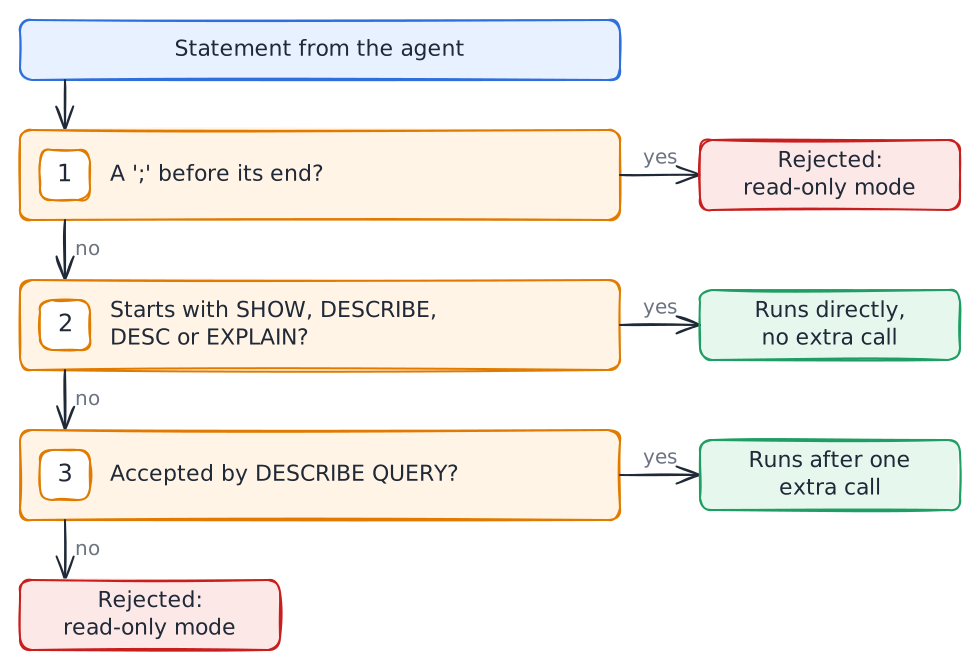
- Semicolons. A statement with a
;before its end is rejected, whether it holds several statements or a;inside a string literal. The check cannot tell the two apart. A single trailing;is fine. To use a literal that contains;, pass it as a:nameparameter. - Inspection commands.
SHOW,DESCRIBE,DESCandEXPLAINrun directly, without an extra call, only when the keyword is the first word of the statement. Leading spaces, tabs and line breaks are allowed. A keyword followed by:(a SQL scripting label) does not qualify. Comments are not skipped on purpose: a scanner that disagreed with the Databricks lexer could let a write through. - Everything else must pass
DESCRIBE QUERY <statement>. Databricks accepts this only for queries, such asSELECTorWITH. A statement that does not parse as a query is rejected. This includes aSHOW,DESCRIBEorEXPLAINthat starts with a comment: remove the comment.
Databricks parses each statement itself, so comments, string literals and dialect features cannot hide a write, and the check never executes the statement.
What read-only mode does not stop
- Reads outside your intent. A read can reach any table the identity can read. The check does not limit which tables a query touches.
- Functions inside a query. The check does not block functions such as
secret()orhttp_request(). Only the identity's privileges do: noREADon secret scopes, and noUSE CONNECTION. - Prompt injection. Everything the identity can read can reach the agent's context, and through it any other tool the agent has, such as a shell or a web fetch. Table comments and data are untrusted input.
For the privileges that close these gaps, see authentication.
Enabling writes
Writes are off. Enable them only when they are intended:
dak mcp --profile dev --allow-writesor set DAK_ALLOW_WRITES=true. Writes still need the Unity Catalog privileges to match, such as MODIFY and the DDL privileges you allow. An export goes through the same check, so an export of a write statement is rejected in read-only mode.
Troubleshooting a rejection
| Message | What to do |
|---|---|
Read-only mode: ... with a statement that is a query | Remove a leading comment, or move literal ; characters into :name parameters |
Read-only mode: ... for a write | Expected. Restart with --allow-writes only if writes are intended |
Read-only check did not finish ... | The warehouse is starting. Retry in a moment |
More cases are in troubleshooting.