Security model
dak is designed so that an agent gets governed access to data, and so that a mistake or a manipulated prompt does less damage. This page lists what protects the data, what does not, and what you have to do.
Where the boundary is
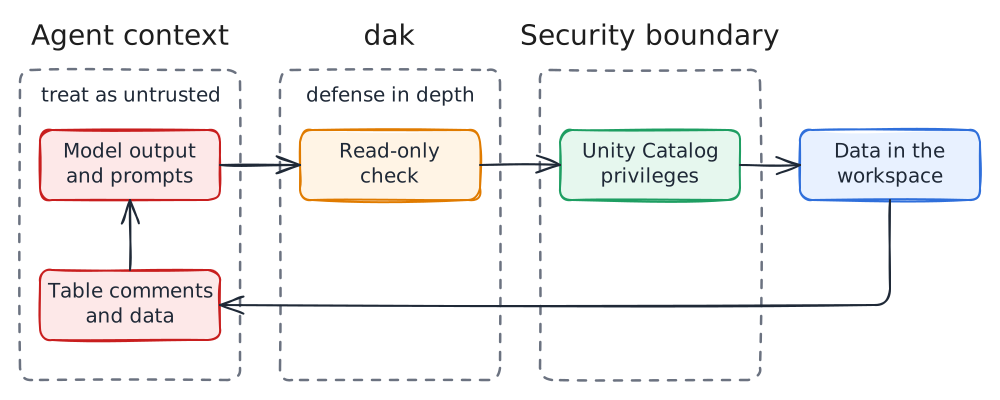
The Unity Catalog privileges of the identity are the security boundary. Neither the Statement Execution API nor MCP offers a read-only mode, and MCP tool annotations are only hints to the client. The read-only check decides whether a statement reads. It does not limit what a read can reach.
What protects the data
- Read-only by default. Every statement is checked before it runs, and writes need
--allow-writes. See read-only mode. - Databricks parses each statement. Comments, string literals and dialect features cannot hide a write, and the check never executes the statement.
- Parameters are not interpolated. Values in
execute_sqlgo through the API as parameters, never into the SQL text. - Tokens stay in memory. They are refreshed before they expire, sent only to the workspace host, and never written to logs or tool output.
- Redacted logs. Parameter values, result rows, tokens and keys such as
token,secret,passwordandauthorizationare not stored. - Limits. Results are capped in rows and bytes, by Databricks and again by
dak, so a large result never floods the agent.
What does not protect the data
- Reads are not limited by the check. A read can reach any table the identity can read. Keep the identity's privileges narrow.
- Functions inside a query are not blocked.
secret()andhttp_request()run if the identity may use them. DenyREADon secret scopes andUSE CONNECTIONto agent identities. - Prompt injection. Everything the identity can read can reach the agent's context, and through it any other tool the agent has, such as a shell or a web fetch.
- Data on disk. The operational logs hold SQL text (cut at 4096 characters), so literals in a query are stored there for up to 90 days. Exports are plain files: CSV, Parquet or SQLite, without encryption.
Transports
- stdio runs one process per agent session, with no network listener.
- Streamable HTTP listens on
127.0.0.1:8765by default. It rejects requests with a foreignHostheader (DNS rebinding protection) and, on loopback, browser requests from a non-localOrigin. - Off loopback, binding needs
DAK_HTTP_TOKEN(at least 32 characters). Clients send it asAuthorization: Bearer. - TLS is not built in. Off loopback, put the server behind a TLS-terminating reverse proxy, so the token is not sent in clear text.
- One identity for all clients. Everyone connected to a shared server uses its Databricks identity, and sees the logs of every other client.
What you should do
- Create a dedicated identity for agents: a service principal, or a user or group used only for agents.
- Grant
CAN USEon one SQL warehouse, andUSE CATALOG,USE SCHEMAandSELECTonly on the data the agent may read. - Do not grant
MODIFY,CREATE, ownership,READon secret scopes, orUSE CONNECTIONto that identity. - Keep writes off unless you intend to change data.
- Use OAuth through the CLI or a service principal, not a long-lived personal token, where the workspace allows it. See authentication.
- Set a 32-character or longer
DAK_HTTP_TOKENand a TLS proxy before exposing the HTTP transport beyond loopback. - Point
DAK_EXPORT_DIRto a directory that only you can read, and delete exports you no longer need. - Run
dak doctorafter every change to confirm the setup.