Connect your agent
Examples use a profile named dev, as in the quickstart. If you did not run npm link, replace dak with node <absolute-path>/dist/cli.js.
dak runs in one of two transports:
- stdio: the agent starts one
dakprocess per session. Nothing is listening on the network. - Streamable HTTP: one server runs on your machine and every agent connects to its URL.
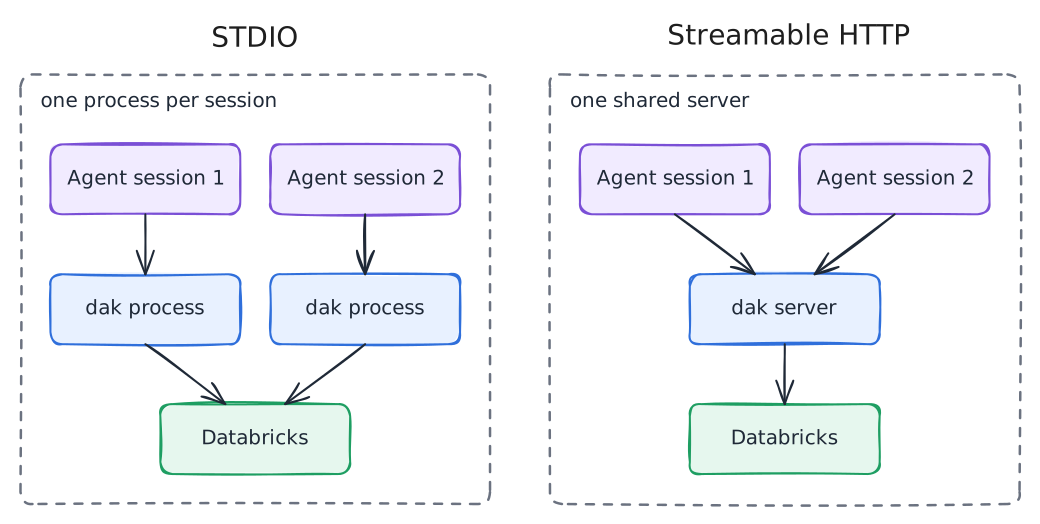
Use stdio unless you need one shared server, for example to keep one log view across several agents or to run the server on a remote machine behind a proxy.
stdio
claude mcp add --scope user databricks -- dak mcp --profile dev[mcp_servers.databricks]
command = "dak"
args = ["mcp", "--profile", "dev"]{
"mcp": {
"databricks": {
"type": "local",
"command": ["dak", "mcp", "--profile", "dev"],
"enabled": true
}
}
}{
"mcpServers": {
"databricks": { "command": "dak", "args": ["mcp", "--profile", "dev"] }
}
}Windows
Some clients cannot launch dak.cmd. Set command to node and pass the absolute path to dist/cli.js as the first argument, followed by mcp --profile dev.
Streamable HTTP
Start the server once:
dak mcp --transport http --profile dev # http://127.0.0.1:8765/mcpThen point the clients at the URL:
claude mcp add --transport http databricks http://127.0.0.1:8765/mcp{
"mcp": {
"databricks": {
"type": "remote",
"url": "http://127.0.0.1:8765/mcp",
"enabled": true
}
}
}How the HTTP transport protects the server:
- Loopback only by default. Requests with a foreign
Hostheader are rejected (DNS rebinding protection). On loopback, browser requests from a non-localOriginare rejected too. - Token off loopback. Binding to another address, for example
--host 0.0.0.0, requiresDAK_HTTP_TOKENwith at least 32 characters. Generate one withopenssl rand -hex 32. Clients then sendAuthorization: Bearer <token>. The token can also be set on loopback. For Claude Code, add--header "Authorization: Bearer <token>"to the command above. - TLS is your job. The server speaks plain HTTP. Off loopback, put it behind a reverse proxy that terminates TLS, so the token is not sent in clear text.
- One identity for all clients. Every client uses the server's Databricks identity. Client credentials are never forwarded to Databricks.
- Shared visibility. The log resources show the calls of every client, SQL text included. Exports are written on the machine that runs the server, not on the client's machine.
Agents that also have the official Databricks skills
If the Databricks CLI installed skills that tell the agent to run SQL or explore schemas with the CLI, add the MCP precedence note to your global instructions. See coexistence with Databricks skills.
After you connect
Ask the agent to list the SQL warehouses it can use. The resource resource://databricks/warehouses shows the same list and marks the default warehouse, for clients that read MCP resources. If a tool call fails, see troubleshooting.