Exporting results
Use export when a result is too large for the agent's context, or when another tool needs the data in a file. The rows never travel through the agent: the server downloads them from Databricks and writes them to disk.
Start an export
Pass export to execute_sql:
{
  "statement": "SELECT * FROM main.sales.orders",
  "export": { "format": "parquet", "name": "orders" }
}formatiscsv,parquetorsqlite.nameis an optional label. Characters outsideA-Z a-z 0-9 . _ -become_, and the label is cut at 64 characters. The agent cannot choose a path.
The call returns at once with the statementId and an export descriptor (id, format, path, status). The export runs in the background. row_limit and DAK_MAX_ROWS do not apply to an export. The size limit is DAK_EXPORT_MAX_BYTES (default 10 GiB).
Lifecycle
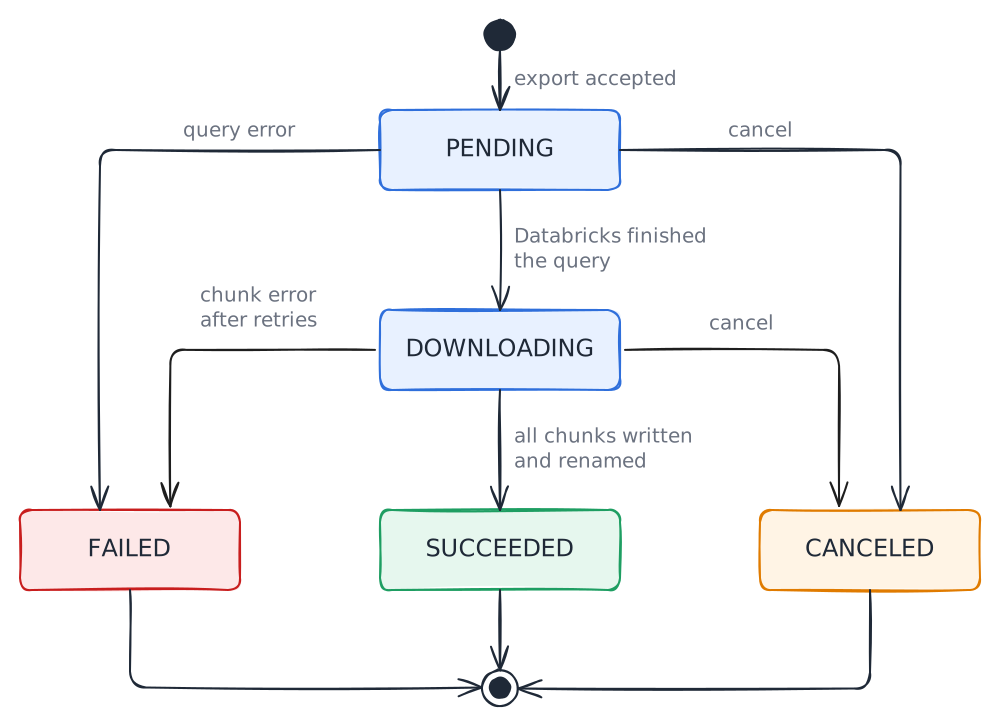
Follow the export with get_statement, using the statement_id. It returns the state under export.status:
| Status | Meaning |
|---|---|
PENDING | The query is still running in Databricks |
DOWNLOADING | Chunks are being downloaded. progress has chunksDone, chunksTotal, rows and bytes |
SUCCEEDED | Done. files, rows, bytes and truncated are set |
FAILED | Failed. error has the reason, and no partial file is left behind |
CANCELED | Cancelled. The partial files were deleted |
Pass wait_seconds (0 to 30) to wait for the export to end before the answer, instead of polling. Pass cancel: true to cancel the statement in Databricks, stop the download and delete the partial files.
When the result is larger than DAK_EXPORT_MAX_BYTES, Databricks cuts it. The export still ends SUCCEEDED, with truncated: true.
Formats
| Format | Result | Notes |
|---|---|---|
csv | <id>.csv | One file, however many chunks Databricks returns. One header line |
parquet | <id>/part-00000.parquet, part-00001, ... | One ZSTD-compressed file per chunk, in a directory. DECIMAL, TIMESTAMP, STRUCT and ARRAY keep their types |
sqlite | <id>.db | One file with the table result |
Each output is written under a temporary name (<id>.csv.part, <id>.db.part, or the directory <id>.part/ for Parquet) and renamed when complete. An unfinished export never looks finished.
The export identifier is <name or "export">-<full statement id>. If the target already exists, the export is rejected with Export <path> already exists; choose another name., and its statement is cancelled in Databricks.
Where the files go
Every export is written under DAK_EXPORT_DIR. Its default is <log storage>/exports, see configuration. A relative DAK_EXPORT_DIR is resolved against the working directory of the server process, so prefer an absolute path.
Outside Windows, the server creates the directory with mode 0700. Anyone who can read the directory can read the exports. In HTTP mode the files are on the server machine.
Caveats
CSV
NULL. Databricks writes SQLNULLas the textnull, anddakdoes not change the bytes it receives. ANULLcannot be told apart from the string"null". Use Parquet or SQLite when the difference matters.SQLite types. Values arrive as text, and the column affinity converts them:
Databricks type SQLite column Conversion TINYINT,SMALLINT,INT,BIGINTINTEGERNone. BIGINTstays exactBOOLEANINTEGERtruebecomes 1 andfalsebecomes 0FLOAT,DOUBLEREALNone DECIMALof 15 digits or fewerREALNone DECIMALof more than 15 digitsTEXTNone, so no precision is lost DATE,TIMESTAMP,STRINGTEXTNone STRUCT,ARRAY,MAPTEXTwith JSONNone. Query them with json_extractAnything else, such as BINARYand intervalsTEXTNone An empty column name becomes
column_<position>. A repeated name gets the first free suffix_2,_3, and so on, because SQLite compares names without case. SQLite allows at most 2000 columns.No resume, no deletion. Exports live in the server process. If it restarts or stops, a running export is lost, and
dakdoes not resume it: run the statement again. On a clean shutdown, its partial files are deleted.daknever deletes a finished export. At startup it removes.partleftovers older than 24 hours.Presigned links. Result chunks come from cloud storage, not from the workspace host. A proxy or firewall that allows the workspace can still block them.
dak doctorreports this under Result download.Download retries. A network error,
429or5xxis retried up to three times, after 500 ms, 1 s and 2 s. A403or an expired link gets one fresh link. Anything else fails the export.
Error messages and fixes are listed in troubleshooting.